
SVRI FORUM 2026: PRESENTER GUIDELINES
ORAL PRESENTATIONS
Congratulations, and thank you for being part of the SVRI Forum 2026. We are delighted you will be presenting your work in Bangkok. To help you prepare for your Oral Presentation, please read the following instructions carefully.
Detailed programme:
Please see the detailed programme online here. If you need to update any details of your presentation or the author/presenter list, please contact us at forums@svri.org.
Presentation software:
Presentations must be in 16:9 widescreen format. Use Microsoft PowerPoint (.pptx) where possible. If you use alternative software such as Google Slides, Keynote or LibreOffice, export your file as .pptx or .pdf before submission. We cannot guarantee compatibility for files not saved in these formats.
Fonts:
Use standard, widely supported fonts such as Arial, Calibri or Times New Roman. If you use a custom font, embed it in your PowerPoint file (File > Options > Save > Embed fonts in the file) so it renders correctly on the conference computers.
Images:
Use .jpg, .jpeg, .png or .gif formats. Avoid embedded .tif or .bmp files, as these can significantly increase file size. Ensure images are high resolution, at least 150 dpi, for clear projection. Given the sensitive nature of the topics addressed at the Forum, please avoid graphic, disturbing or traumatic images, and use visual content that is respectful and appropriate for a diverse, international audience.
Videos:
Embed videos directly in your PowerPoint file. Supported formats are .mp4 (H.264 codec, recommended), .wmv and .avi. Do not use .mov or Apple QuickTime formats, as these are not supported on Windows. Keep video files compressed to a reasonable size, as lower-resolution video is often sufficient and more reliable. When submitting your file, make sure all linked media are included, and always test your videos at the Speaker Prep Station before your session.
Animations:
Use simple entry animations only, such as Appear, Fade or Fly In. Avoid exit animations and complex transitions, as these may not render correctly across all PowerPoint versions.
Mac users:
If your presentation was created on a Mac, it is essential that you review it on a Windows PC at the Speaker Prep Station, particularly if it contains video, custom fonts or linked media. The conference computers run Windows with Microsoft PowerPoint. Export your file as .pptx and test it in advance to avoid problems on the day.
General presentation tips:
The visuals you project should clarify your ideas, emphasise key points, show relationships and give your audience the information they need to follow you. Keep slides clear and uncluttered, use bullet points sparingly and limit the text on each slide. Favour simple graphs and diagrams over dense data tables, so as to avoid the “eye chart” effect. Use high-contrast colour combinations; dark backgrounds with light text generally project well in large rooms. Limit yourself to two or three font sizes per slide and keep all text horizontal. Make your slides accessible by adding alt text to images and not relying on colour alone to convey meaning.
Focus on your message:
However technical or detailed your work, make sure your audience leaves knowing why it matters. Be clear about what you found, what it means and what should change as a result. The strongest presentations are the ones where the impact of the work is unmistakable.
Consent:
Please do not share personal information or images without consent. Given the nature of the work presented at the Forum, take particular care with anything that could identify a research participant, a survivor or a community.
Loading your presentation:
Personal laptops are not permitted in any session venue, and all presentations must be loaded onto the conference system in advance. Presenters must confirm their presentation is loaded at the Speaker Prep Station at least one day before their session. Presentations may not be uploaded by USB or any personal device inside the session venues; uploads are only permitted at the Speaker Prep Station. To avoid peak-time queues, plan your visit accordingly.
Meet your Session Chair beforehand:
We will introduce you to your session Chair via email. Please arrange a short meeting with your Session Chair ahead of your session, either at the Forum or by email in the days before. It is your responsibility to arrange this, not the organisers’. This is where the panel agrees on how the session will run, including whether questions are taken after each presentation or held until all presentations are done.
On the day of your talk:
Arrive in the session room at least 10 minutes before the session begins and introduce yourself to the Session Chair. Take a seat in the front rows so you can move to the podium promptly when it is your turn. A remote clicker with a built-in laser pointer is provided at the lectern to advance your slides, along with a mouse and keyboard. The Session Chair will use a digital timing system, so please keep strictly to your allocated time [state the allocated time here, for example 15 minutes including questions, or say where presenters will find it]. You will be given a clear signal when your time is up.
Equipment:
Each session room has a Windows PC operated by a technician, a projector, a screen, a lectern and a lectern microphone. No personal equipment may be brought in. Your presentation will be loaded onto the room’s PC before your session, and a comfort monitor at the lectern will display your slides.
Sharing your presentation:
Presentations will be made available online after the Forum, unless you have told us you would prefer us not to. You will have indicated your preference in the registration form. If you would like to change it, please let us know before the Forum.
Submission:
Please send your presentation or the download link to svriforumpresentations@gmail.com by 14 September 2026. There will be an opportunity to edit your slides at the Speaker Prep Station if necessary. If you do want to send an updated slide to us via email after your initial submission, please make it clear in the subject line. Presentations submitted after the deadline cannot be guaranteed for inclusion so please do come and check with us at the Speaker Prep booth on site.
Conference app:
Details of the official SVRI Forum 2026 app, including download instructions and access codes, will be sent to all registered presenters separately. See more information here.
SVRI FORUM 2026: PRESENTER GUIDELINES
FIVE MINUTE PRESENTATIONS
Congratulations, and thank you for being part of the SVRI Forum 2026. We are delighted you will be presenting your work in Bangkok. To help you prepare for your Five-Minute Presentation, please read the following instructions carefully.
Detailed programme:
Please see the detailed programme online here. If you need to update any details of your presentation or the author/presenter list, please contact us at forums@svri.org.
What is a Five-Minute Presentation?
A Five-Minute Presentation (FMP) is a concise, well-prepared five-minute description of your research or programme. FMPs are all about telling a story, which is why the format has become so popular at the SVRI Forum.
Presentation length:
You have five minutes to present your work, with no time for questions. During FMP panels, 12 to 15 presentations are delivered over 90 minutes.
Slides and visuals:
You may use one slide only, so think carefully about what to show. We suggest a single image, phrase or visual that captures your research or programme: a photograph of the people you work with, your curriculum, or the key question your work is trying to answer.
Ethics:
Given the sensitive nature of the topics addressed at the Forum, please avoid graphic, disturbing or traumatic images, and use visual content that is respectful and appropriate for a diverse, international audience. Please do not share personal information or images without consent, and take particular care with anything that could identify a research participant, a survivor or a community.
Sharing:
FMPs will be made available online after the Forum, unless you have told us you would prefer us not to. You will have indicated your preference in the registration form. If you would like to change it, please let us know before the Forum.
Send us your slide:
Even though it is only one slide, you must send it to us in advance. Your slide must be a PowerPoint file. We cannot accept standalone JPEG, PNG or PDF files, so please place your image inside a PowerPoint slide exactly as you want it displayed. All slides will be compiled into one master presentation. Please name your file Surname_Firstname_Session, so we can match it to you and your time slot, and send it to svriforumpresentations@gmail.com by 14 September 2026. There will be an opportunity to edit your slide at the Speaker Prep Station if necessary. If you do want to send an updated slide to us via email after your initial submission, please make it clear in the subject line. Presentations submitted after the deadline cannot be guaranteed for inclusion so please do come and check with us at the Speaker Prep booth on site.
Practice:
FMPs are short, but they can be powerful. Practise your pitch, check that it runs to five minutes, and aim to sound natural rather than rehearsed – it also helps with the nerves.
Timing:
You really do have only five minutes. Your Chair will not have time to introduce each speaker, so please introduce yourself briefly once you are on stage. The Chair will stop you at five minutes so that you do not run into the next presenter’s time. Practise beforehand. We cannot say this enough.
Guidance:
For help developing a five-minute presentation, see: Lightning talks: science in 5 minutes or less.
SVRI FORUM 2026: PRESENTER GUIDELINES
POSTER PRESENTATIONS
The SVRI is delighted to be showcasing your poster. To help you prepare, please read the following instructions carefully.
Designing your poster
Poster size:
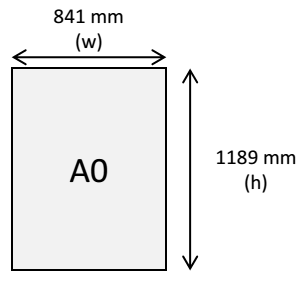
Posters must be A0 portrait (841mm x 1189mm). A0 landscape posters cannot be accommodated.
Layout:
Aim for roughly 20% text, 40% graphics and 40% space. Let your ideas flow logically from one section to the next. Use charts and graphs rather than large tables of raw data, and high-resolution photographs, as web images often will not print well. Please do not set text in all capitals. Posters are displayed on one side of a board provided by the Forum.
Ethics:
Given the sensitive nature of the topics addressed at the Forum, please avoid graphic, disturbing or traumatic images, and use visual content that is respectful and appropriate for a diverse, international audience. Please do not share personal information or images without consent, and take particular care with anything that could identify a research participant, a survivor or a community.
Printing:
You are responsible for printing your own poster, and we recommend you hand-carry it to the conference. For a paper poster, ask your printer for large-format digital printing.
Your poster day
You will be given an assigned number and a display day in the poster schedule, and your poster will be up for one full day. The posters change daily from Tuesday to Thursday, and they are displayed on the 22nd floor, alongside Registration, Speaker Prep, the Plenary and the Exhibition. Please follow the signage to the poster area.
Please be available to present your poster over lunch, from 12:30pm on your display day.
Please see the detailed programme online here. If you need to update any details of your presentation or the author/presenter list, please contact us at forums@svri.org.
Putting up and taking down
Putting up and taking down
By 8:00am, hand your poster in at the Speaker Prep booth so it is ready before the plenary begins. When you hand it in, please mark your poster with your name and surname so staff can place it correctly, in line with the programme book. Double-sided tape will be provided for mounting, and staff will be on hand to help you put it up and take it down.
If you are at the Centara Grand Convention Centre the day before, on Monday, you may drop your poster at the Speaker Prep booth in advance.
From 7:30pm, Forum staff will take posters down. You can collect yours from the Speaker Prep booth the following day.
How to be a great panel Chair
A practical guide for SVRI Forum 2026
At the SVRI Forum, we see our Chairs as the foundation of a successful panel.
When a session runs well, you feel it – the speakers are relaxed, the audience is engaged, and there is real time for discussion at the end. That comes down to three things:
- preparation,
- timekeeping,
- warmth.
This guide walks you through each stage, from your first email to your closing remarks.
Before the Forum
Great chairing starts long before you reach the room. By the time your session opens, you should know your speakers, their work, and exactly how the session will run.
- The SVRI will introduce you to your panellists by email. Once we have, follow up with a short message introducing yourself and opening the conversation.
- Read the abstract for each presentation, which we will ask presenters to share with you, so you understand the panel’s overall theme and the focus of each talk.
- Ask each speaker for a short bio so you can introduce them and check how to pronounce their name. Practice your introductions out loud. Rehearsing in your hotel room the night before is not overkill; the audience can hear the difference.
- Agree to the structure of the session with your speakers by email i.e.. the running order, the length of each presentation, and how much time is reserved for discussion.
- Decide together when questions will be taken. We recommend holding all questions until after the final presentation, as time is tight.
On the day
- Meet your presenters in the room 10-15 minutes before the session starts to confirm final arrangements.
- Check that every presentation is uploaded and that the equipment works.
- If you have not met a speaker in person before, confirm the pronunciation of their name face-to-face.
- Start on time. The Forum programme is full, and every presenter has worked hard for their slot. A late start takes time from the speakers at the end of your session.
- Put your panellists at ease. Presenting is stressful for many people, and a calm, friendly Chair settles the whole room. If you are relaxed, your speakers will be too.
Opening the session
Open with a short, confident framing that tells the audience what to expect:
- Introduce yourself, welcome the audience, and set up the session topic.
- Flag any changes from the printed programme.
- Introduce each speaker as their turn comes: name, institutional affiliation, and the topic of their presentation.
- After the final presentation, thank the speakers and open the floor for questions.
- Close with brief remarks and a vote of thanks.
Keep time, and be strict about it
Timekeeping is your most important job. Every presentation is 10 minutes – your role is to hold everyone to them.
- Do not let speakers run over. Every extra minute is taken from the next speaker or from the discussion, and it is not yours or theirs to give away.
- Give clear warnings at 5, 3, and 1 minutes remaining. The SVRI will inform you of available electronic timers on screen closer to the Forum.
- If the session falls behind, shorten your own introductions and invite speakers to fill in their background. They will do it quickly, because it costs them presentation time.
- Stay flexible within the limits. If the session starts late, trim presentations proportionally rather than cutting the last speaker short. If extra time opens up, give it to the discussion.
Running the Q&A
- Prepare one or two questions of your own in case the audience is slow to start. A good first question almost always unlocks the room.
- Invite questions from across the audience and from the panel itself.
- Keep exchanges crisp. If a questioner or speaker runs long, or a debate starts to take over, step in politely, ask for the question in a sentence, or suggest the pair continue over the break.
- Draw in the whole panel where you can. A question put to one speaker can often be widened: “Does that match what you found?”
Closing
- Briefly draw together the main points from the presentations and discussion. Two or three sentences is enough.
- Thank the presenters once more for their contributions, and the audience for their participation.
- And enjoy it. Chairing puts you at the centre of some of the most interesting conversations at the Forum.
How to be a great Five-Minute Presentation Chair
Before the Forum
Join the online briefing for Chairs. Wednesday 16 September 2026, 10am SAST / 3pm ICT. This is a 30 to 45 minute session covering how sessions run on the day, room set-up, technical support, and the practical side of chairing. There’s open time for questions, and it’s the easiest way to meet the SVRI team and the other Chairs. If you can’t attend, we’ll record it and share it. Register here.
Agree how you’ll split the role with your co-Chair. We’ll put the two of you in touch. Most pairs find it works best for one Chair to focus on timekeeping and the other on welcoming presenters, opening the session and closing it. Decide this in advance rather than on the day, and agree your signalling system for the time warnings.
Introduce yourselves to your presenters. We’ll introduce you by email. Once we have, send a short note of your own so your presenters know who to look for on the day. Many people in these sessions are presenting at a conference for the first time, and hearing from their Chair beforehand takes some of the nerves out of it.
A note on changes. Some presenters are still securing visas, so your line-up may change. We’ll send a final list closer to the Forum and flag any changes to you directly.
At the Forum
Ask your presenters to meet you in the room 10 minutes before the session starts, so they can be seated in presentation order. The SVRI team will have a speaker list in the room and we’ll keep the first one or two rows closest to the stage free.
Check that everyone has submitted their slide. Anyone who hasn’t needs to visit the presentation booths before the session starts. If a slide isn’t in the room in time, the presenter will need to speak without it. SVRI will remind presenters to submit their slides by 14 September.
Start on time. The programme is full and every presenter has worked hard for their five minutes.
Running the session
Open by introducing the overall topic and the shape of the session, then invite the first speaker up.
You don’t need to introduce speakers individually. Presenters introduce themselves, and in a session this fast that’s the only way the timing works.
Keep the transitions short and the energy up. The rhythm of the session is part of what makes it enjoyable.
Keeping to time
Time management is your most important job. Presentations are strictly five minutes. Going over isn’t a small thing: every extra minute comes out of someone else’s five.
We’ll provide a timer in the room. Give speakers two minute and one minute warnings, and agree beforehand how you’ll signal that time is up.
Be firm and be kind. Most presenters who overrun aren’t being inconsiderate, they’re nervous or lost track of time. A clear, warm signal is usually all it takes.
Closing the session
There is normally no time for questions and answers in this format. Encourage the audience to find presenters afterwards to continue the conversation.
Thank all presenters for their contribution and the audience for coming.
Enjoy it. These sessions are genuinely good fun to chair.